
I was sitting with a few colleagues a while back - the kind of engineers who make you feel slow in a code review - and we got to talking about coding agents. Which one’s worth paying for, where they fall on their face, the usual.
Somewhere in there one of them said, more thinking out loud than asking, “honestly I’m not sure how the agent even picks what to read. Does it just get the whole repo?”
Nobody answered. We moved on.
But it nagged me. Look at everything packed into that one shrug. Something reads the file off the disk. Something decides which file, how much of it, and whether reading a file is even the right move right now. Something holds onto what you said three turns ago so it’s still around on the next one. That’s a pile of work and a pile of decisions - and all of it is plain code that somebody sat down and wrote.
That code has a name. It’s the harness. And the people leaning on it every single day had never looked inside it.
What got me is how boring it is in there. No secret sauce, no orchestration trick the Cursor or Claude Code people figured out that the rest of us are just renting. A harness is an HTTP POST in a while loop: send the model some text, get some back, run whatever it asked for, go around again. That’s not me simplifying for the blog. That’s the shape of the whole thing.
So I ran a workshop for my team and we built one from scratch, together, in an afternoon. This is that workshop, on the page.
We’ll start with an empty file and end with a working coding agent - every line that matters, nothing hand-waved. By the last section, the only thing between you and your own harness is the time it takes to type it out.
No magic. Let me show you.
Agent = Model × Harness
Before any code, one piece of vocabulary - and it’s worth borrowing the real-world meaning, because it’s the whole point.
A harness, the original kind, is the rig of straps you put on a horse. It doesn’t make the animal any stronger - it gives you reins, so all that power goes where you want it. Without it you’ve got a very capable animal and no way to steer.

An agentic harness is the same idea, pointed at a model instead of a horse.
The model is the power - it can write code, reason about a bug, plan a refactor. But on its own it’s a horse with no reins: text in, text out, and that’s the end of its reach. It can’t open your files, run your tests, or remember what you said a minute ago. The harness is everything we strap around it to fix that.
Concretely, it’s the code that:
- feeds the model context - the system prompt, your files, the conversation so far
- runs the tools the model asks for - reading a file, running a command, searching the web
- remembers - holding the whole back-and-forth so the model isn’t a goldfish
- closes the loop - taking what a tool returned and handing it back to the model to react to
- enforces the limits - deciding what the model is and isn’t allowed to touch.
None of that is the model. All of it is plain code we’re about to write.
So the agent you use every day is both halves together: Model × Harness
That’s why the same model feels like a different tool depending on where you meet it. It’s the same Claude Opus 4.8 behind Cursor, behind Claude Code, behind OpenCode - same brain every time. What changes is the rig around it. The harness is the part you can shape, which makes it the part worth understanding.
So let’s go build one. From the most boring possible starting point.
A REPL with a borrowed brain
For the purpose of the story, let’s say we are the maintainers of a tiny open source Python library called slugkit with one function, slugify, that’s supposed to turn "Hello, World!" into a clean URL slug.
Someone filed a bug: it’s spitting out hello--world with a double hyphen instead of hello-world. Our goal is to build an harness that can fix that bug.
We start, of course, with crafting our “brain” - a function that uses Anthropic’s Messages APIto allow us to make inference calls to the LLM:
def model(messages, system="", tools=()):
    return requests.post(
        "https://api.anthropic.com/v1/messages",
        headers={"x-api-key": ANTHROPIC_API_KEY,
                 "anthropic-version": "2023-06-01"},
        json={"model": "claude-opus-4-8", "max_tokens": 4096,
              "system": system, "messages": messages, "tools": tools},
    ).json()
That’s the model. You POST some messages, you get a response. There’s no state hiding in there, no session, no memory - every call is a blank slate. Hold onto that, because half of what the harness does is paper over it.
Wrap it in a loop and you’ve got the world’s dumbest REPL:
while True:
    user_input = input("> ")
    reply = model([{"role": "user", "content": user_input}])
    print(reply["content"][0]["text"])
Let’s give it the job:
> fix slugify
Sure! Here's a haiku about garden slugs:
  a silver trail glints -
  the slow wanderer at dawn
  leaves its mark, then gone.
…okay. In fairness, I said “fix slugify” to a thing that has no idea it’s a coding agent. It’s a general-purpose chatbot, “slugify” reads like a cute writing prompt, and we never told it otherwise.
Step 1: Adding a system prompt
So let’s tell it. The API has a system parameter that sits outside the conversation and allows us to specify the system prompt for our little agent - a set of foundational instructions given to an AI model that defines its role, behavior, tone, and constraints. It acts as the AI’s “job description,” guiding how it should respond to all subsequent user requests.
Here’s the system prompt that we will provide our little agent with:
SYSTEM = """You are a coding agent.
Make small, focused edits.
Prefer existing project patterns.
Run tests after every change.
Ask before anything destructive."""

reply = model(messages, system=SYSTEM)
Run it again:
> fix the slugify bug
Happy to help - which file is it in?
> src/text_utils.py
Thanks! So - what are we working on today?
It knows it’s a coding agent now. It asked the right question. There’s only one, tiny issue - it has no memory! That’s the blank slate biting us. Remember - each model() call stands alone - the second time around, the agent has no clue the first exchange ever happened. It’s a goldfish.
Step 2: Adding conversational history
The fix is almost insultingly simple: keep the conversation in a list, and replay the whole thing every turn.
messages = []                                          # the harness's memory

while True:
    user_input = input("> ")
    messages.append({"role": "user", "content": user_input})
    reply = model(messages, system=SYSTEM)
    text = reply["content"][0]["text"]
    messages.append({"role": "assistant", "content": text})
    print(text)
There’s the “memory.” It’s a list. Nobody’s keeping your conversation in some clever store in the server - the harness hangs onto every message and ships the entire transcript back, top to bottom, on every call. The model re-reads the whole thing each time and picks up where it left off.
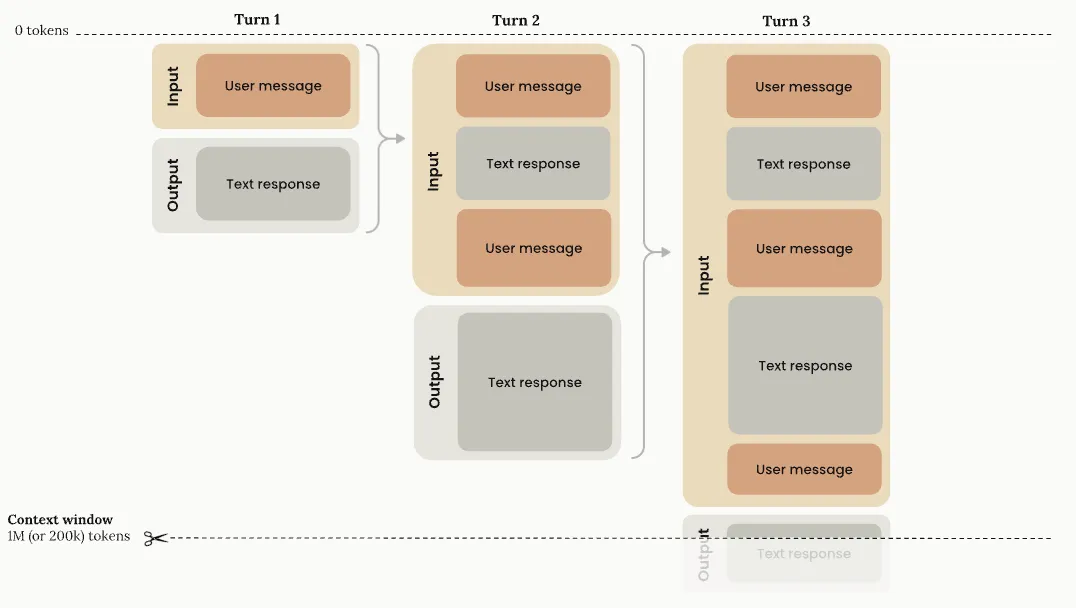
It’s also why a long session gets slow and pricey, and why the agent eventually “forgets” something you said an hour ago. It’s all riding in that one list, and the list has a ceiling. More on that later.
For now: the agent has a job and a memory. It still can’t touch a single file.
The model is sealed in a box
Here’s the thing that took me longest to internalize: the model genuinely cannot do anything except produce text. It’s like a brain in a jar - it can think, but without the harness it cannot see or interact with the real world.

Which means tools aren’t a feature we’re bolting on for power. They’re the model’s only window onto the world. No tools, no eyes.
Step 3: Adding tools
So let’s give it one. Reading a file seems like a reasonable first verb:
@tool   # builds the JSON schema from the function signature
def read_file(path, offset=0, limit=120):
    """Read a line-numbered window of a file."""
    lines = open(path).read().splitlines()
    window = lines[offset : offset + limit]
    return "\n".join(f"{offset + i + 1:>4} | {ln}"
                     for i, ln in enumerate(window))

TOOLS = [read_file]
As you can see, tools are just ordinary Python functions - no LLM magic, everything deterministic.
The interesting part is what the @tool decorator does with it (and again, this is just a sample code - the code itself is not the point, it’s the concept that matters): it reads the signature and docstring and turns them into a plain JSON object - a contract the model can actually read. That object is the tool, as far as the model is concerned:
{
    "name": "read_file",                              # what the model calls
    "description": "Read a line-numbered window.",    # WHEN to reach for it
    "input_schema": {                                 # WHAT it must hand over
        "type": "object",
        "properties": {"path":   {"type": "string"},
                       "offset": {"type": "integer"},
                       "limit":  {"type": "integer"}},
        "required": ["path"],
    },
}
Four things: a name to call, a description telling the model when this is the right move, an input schema spelling out what arguments it can pass, and (back in our code, never sent) the actual function that runs. The model only ever sees the first three. It has no idea there’s a Python function on the other end - it just knows a verb exists and what shape the arguments take.
Now watch what actually goes over the wire. We send the conversation plus the tool contract:
POST /v1/messages
{
  "model": "claude-opus-4-8",
  "messages": [
    { "role": "user", "content": "fix the slugify bug" }
  ],
  "tools": [
    { "name": "read_file", ... }
  ]
}
And the model answers - not with text, but with a request to use the tool:
{
  "stop_reason": "tool_use",
  "content": [{
    "type": "tool_use",
    "id": "toolu_01abc",
    "name": "read_file",
    "input": { "path": "src/text_utils.py", "offset": 0, "limit": 120 }
  }]
}
When the harness sees this tool_use request, it calls a dispatch function that resolves the tool id to a handler function and runs it:
TOOL_HANDLERS = {"read_file": read_file, "edit_file": edit_file, "bash": bash}

def dispatch(block):                       # one tool request from the model
    name, args = block["name"], block["input"]
    try:
        handler = TOOL_HANDLERS[name]      # the model only handed us a name
        output = str(handler(**args))      # plain Python, running on your machine
    except Exception as e:
        output = f"Error: {type(e).__name__}: {e}"
    return {
        "type": "tool_result",
        "tool_use_id": block["id"],        # ties the answer back to the question
        "content": output,
    }
With the tool result in hand, the harness then sends the result back as the next message - wrapped so the model knows which request it’s answering:
POST /v1/messages
{
  "messages": [
    { "role": "user",      "content": "fix the slugify bug" },
    { "role": "assistant", "content": [ /* the tool_use block from above */ ] },
    { "role": "user", "content": [{
      "type": "tool_result",
      "tool_use_id": "toolu_01abc",
      "content": "   1 | import re\n   2 | def slugify(text):\n   3 | ..."
    }]}
  ],
  "tools": [ { "name": "read_file", ... } ]
}
The tool’s output goes with a tool_use_id that matches the id from its request, so it can line the result up with the right ask when it fired off several at once. Then the model gets the whole transcript again, sees the file it wanted, and decides what to do next.
That’s the whole mechanism. The stop_reason flips to tool_use, and the model hands back a name and a bag of arguments that match the schema we sent. It didn’t read anything. It can’t. It asked us to, and then it stopped and waited - because running the thing is our job, not its.
Which is the loop. Here’s the whole agent, every line:
messages = []
while True:                                   # one turn per thing the user types
    messages.append({"role": "user", "content": input("> ")})

    while True:                               # the agent loop
        response = model(messages, system=SYSTEM, tools=TOOLS)
        messages.append({"role": "assistant", "content": response["content"]})

        if response["stop_reason"] != "tool_use":
            print(text_from(response["content"]))   # no tool wanted - just answer
            break

        results = [dispatch(b) for b in response["content"]
                   if b["type"] == "tool_use"]
        messages.append({"role": "user", "content": results})
Read it slowly, because that inner loop is the entire game
- We send the conversation and the tools.
- The model either answers in plain text - in which case we print it and go back to waiting for the user - or it asks for a tool.
- If it asks, we run the tool, drop the result into the conversation, and loop straight back to the model without stopping for input.
- The model sees the result, decides what’s next, and around it goes.
- Read, run, observe, repeat, until it’s got what it needs and finally just talks to you.
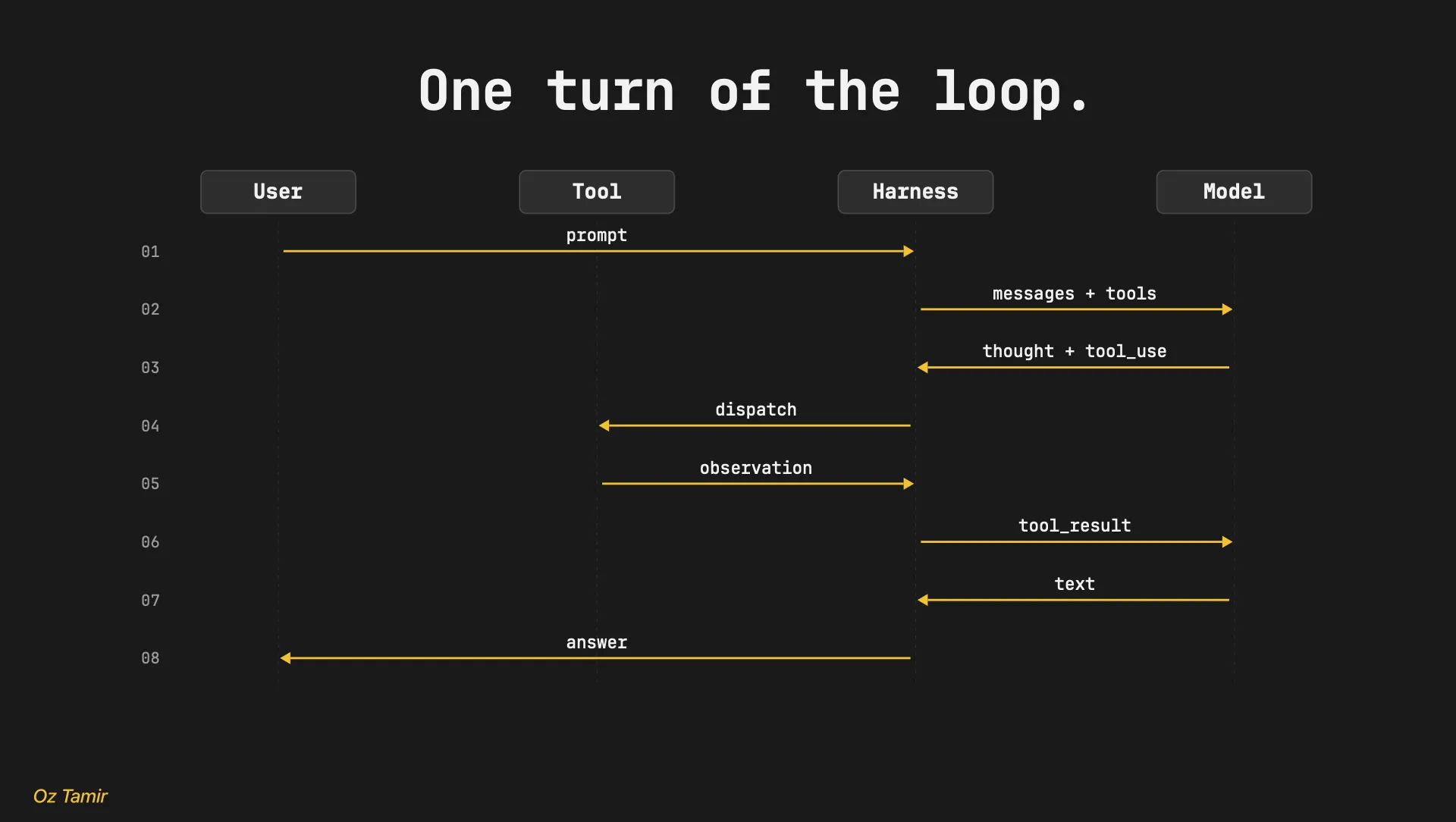
That’s a complete coding agent. After we added some more tools (ls tool, write_file tool, and some other basic ones) we can try to give it the bug again:
> fix the slugify bug in src/text_utils.py
  → read_file("src/text_utils.py", 0, 40)
  Found it: re.sub(r"\s", "-", text) replaces each whitespace character on its
  own, so "Hello, World!" - which has a comma AND a space - becomes "hello--world".
  → write_file("tests/test_slugify.py", ...)
  Added a failing test: slugify("Hello, World!") should be "hello-world".
It read the file. It actually found the bug - the regex matches single whitespace characters, so two in a row produce two hyphens. It wrote a test to prove it. With about forty lines of harness, the thing genuinely works.
Then it says:
  Now let me run the test to confirm the fix...
  → ??? there's no tool for that
  I can't actually execute anything - could you run `pytest -q` and paste the output?
Ah. It can read files and write them, but we never gave it a way to run anything. It’s stuck asking me to be its hands.
We could fix that by adding a tool for every command under the sun - one for pytest, one for git, one for grep, on and on forever. Or we could give it the one tool that already runs every command there is.
So we handed it a shell
The “tool for everything” plan falls apart the second you write it down. You’d need pytest and ls and cat and grep and find and mkdir and mv and git status and git diff and sed and curl and wc and… In the deck I gave for the workshop, had a slide that was just forty of these in tiny type, and the joke is that it isn’t even close to all of them.
You’d be writing tool wrappers until the heat death of the universe, and the agent would still hit the one command you forgot.
Step 4: Command Execution
Luckily, there’s already a program that runs every command there is. It’s the shell. So why don’t we just give the agent bash?
@tool
def bash(cmd, cwd, timeout=30):
    """Run a shell command. Truncate output to the last 8 KB."""
    proc = subprocess.run(cmd, cwd=cwd, timeout=timeout, capture_output=True)
    return tail(proc.stdout, 8 * 1024)

TOOLS = [read_file, edit_file, bash]
One tool. Now the model can run anything - pytest, git, a one-liner it makes up on the spot - and we don’t have to anticipate a thing. The tail is the only bit of taste in there: command output can be enormous, and we don’t want a find / dumping a megabyte into the conversation, so we keep the last 8 KB and toss the rest.
There’s only one tiny problem - we just gave a language model an unsupervised shell on our machine. It can run whatever it wants - including rm -rf, including curl something-sketchy | sh, including things neither of us thought of. The model is usually trying to help. “Usually” is not a security model.
Step 5: Sandboxing
But it’s not all bad. Remember - the model can only see and interact with the world through the lenses that the harness gives it. If we want, we can just give it lenses that, for example, can’t read your .env files! Or ones that prevents it from running dangerous commands!
The dumbest version that does anything is an allowlist and a denylist:
ALLOWED = ["pytest", "ruff", "git diff", "git status", "ls", "cat"]
DENIED  = [r"rm\s+-rf", r"sudo", r"curl.*\|.*sh", r"\bnc\b"]

def bash(cmd, cwd, timeout=30):
    if not any(cmd.startswith(p) for p in ALLOWED):
        raise SandboxError("not in allowlist")
    if any(re.search(p, cmd) for p in DENIED):
        raise SandboxError("matches deny pattern")
    return subprocess.run(cmd, cwd=cwd, timeout=timeout, capture_output=True)
Every command the model wants now has to pass through us first - allow it, refuse it, or rewrite it - before a single byte hits the shell. That’s the real shape of a sandbox: the harness sits between the model and the machine and gets the final say.
I want to be honest about what this is, though: this is not nearly good enough, and it will not save you. The model can write pytest; rm -rf ~ and sail straight past startswith("pytest").
Real isolation happens a level down - a locked-down process, a throwaway container, a filesystem the agent can’t escape - not a regex hoping to outguess a model that’s better at strings than you are.
Back to our slugify bug, the agent now has bash wired up, and it can finally close its own loop:
> fix the slugify bug in src/text_utils.py
  → read_file(...)        found the regex
  → edit_file(...)        \s → \s+
  → bash("pytest -q")     14 passed
  "Fixed - the test that was failing now passes."
It read the bug, fixed it, and proved the fix without me touching the keyboard. That’s the whole job, done.
So we’re finished, right? Ship it?
Not quite.
Context is scarce - and it’s the harnesses’ job to keep it clean
A one-line regex fix is the easy case. The real world looks more like this: before I let the change ship, I want to know if anything depends on the old buggy behavior. If some other code is feeding "a, b" to slugify and expecting a--b back, my fix just broke it.
So I ask:
> collapse the repeats in slugify - but first, does any caller depend
  on the old "a--b" output?
  → bash("grep -rn 'slugify(' src/")    31 hits across 18 files
  → read_file("src/api/routes.py")      1/18
  → read_file("src/cli.py")             2/18
  ... 16 more reads ...
  → read_file("src/feeds.py")           18/18
  "Reviewed all 18. Honestly? Hard to tell now - probably safe?"
Probably safe. On a question about whether it’s safe to change shared behavior, “probably” is the one answer I can’t use.
And it’s not that the model got dumber. Look at what we did to it. Every one of those eighteen files got read into the same conversation, and that conversation is the only thing the model sees on each turn. By the time it reached feeds.py, the window looked like this:
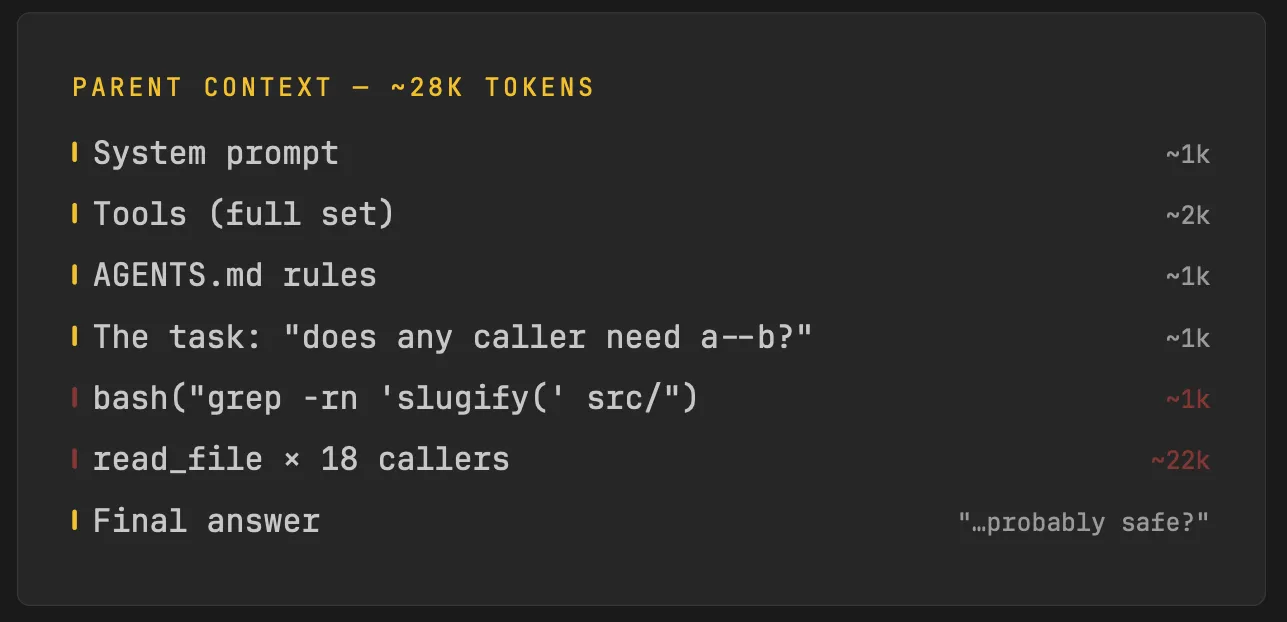
Thousands of tokens for file contents, and somewhere in the middle of it the actual question - does anyone rely on the double hyphen? - got buried under a landslide of imports and helper functions it didn’t need. The thing it was supposed to be reasoning about was a needle in a haystack the model built for itself.
This is the trap with one big context window: every tool result piles into the same place, relevant or not, and the signal-to-noise ratio quietly tanks. More reading made it worse, not better.
What I actually wanted was for someone to go read all eighteen files, think hard, and come back with one sentence - “checked them all, nobody depends on it, you’re clear” - without dumping the raw files on my desk. I wanted to delegate.
Step 6: Subagents!
Which is exactly what a sub-agent is. It’s the same loop we already wrote, running in a fresh, empty context, reachable as just another tool:
def run_subagent(task, tools):
    messages = [user(task)]                       # a brand-new context
    while True:                                    # the same loop. literally the same loop.
        r = model(messages, system=SUBAGENT_SYS, tools=tools)
        messages.append(assistant(r.content))
        if r.stop_reason != "tool_use":
            return summary_of(r.content)           # hand back the conclusion, not the mess
        for b in tool_uses(r):
            messages.append(user(dispatch(b)))
There’s no new machinery here. It’s model in a while loop with its own message list - the agent we built, called from inside the agent we built. The parent reaches it like any other tool:
report = run_subagent(
    task="Find every caller of slugify; flag any that rely on the old 'a--b' output.",
    tools=[read_file, grep, glob],
)
The sub-agent burns its own 22k tokens reading those eighteen files - in a context the parent never sees. All that comes back across the wall is the verdict:
"31 callers, all of them feed URL slugs; none depend on the doubled hyphen. Safe."Eighty tokens instead of twenty-two thousand. The parent stays clean, keeps the thread, and gets a real answer instead of a shrug. The exploring happened somewhere else and only the conclusion made the trip back.
This is the first decision that isn’t about wiring at all. Nothing forced us to spin up a sub-agent - the single-context version ran fine, it just gave a worse answer. Where context goes, and what’s allowed to pile up next to what, turns out to be one of the biggest levers you’ve got. We’ll come back to that.
Don’t make the user the agent’s memory
There’s only one thing that still keeps this harness from being real - you still needs to tell it the same stuff, again and again.
Every. Session. The context resets, the agent shows up fresh and clueless, and the only thing standing between it and a repeat mistake is the user, remembering to brief it again. That’s backwards - humans are the ones with the bad memory. The harness should manage it!
And guess what? Most harnesses do.
Step 7: Agent Rules
Some knowledge is always relevant - the conventions, the gotchas, the “here’s how this repo works.” You want that in front of the model every single time, no questions asked. We call those rules.
Rules go in a file the harness reads on startup and staples to the system prompt. By convention it’s AGENTS.md:
# AGENTS.md
- String utils live in src/text_utils.py; tests in tests/.
- slugify must collapse repeated separators ("a, b" -> "a-b").
- We've had unicode regressions twice - keep the boundary tests.
- Verify with: python -m pytest tests/test_text_utils.py
That’s it. SYSTEM = BASE_PROMPT + open("AGENTS.md").read(), and now every session starts already knowing the lay of the land. The agent never asks “which file is slugify in” again, because the answer was sitting in its context before it read your first word.
This is the same AGENTS.md (or CLAUDE.md, or .cursorrules) you’ve seen in real repos - and now you know exactly what it does. It’s a string that gets concatenated onto the system prompt. That’s the entire mechanism.
It’s important to note, however, that rules do not actually mean that the agent can’t do what they say to avoid doing - they’re the same as regular prompts. The agent can choose to ignore them - which is why you shouldn’t rely on them for guardrails or for keeping the agent from causing harm.
Skills: expertise, written once, loaded on demand
The other type of knowledge only matters sometimes - the step-by-step for a specific job you do occasionally. Loading all of it on every turn would just be more haystack. You want it to show up only when the task calls for it. We call those skills.
For example - “How to safely fix a bug in text_utils.py” is a real procedure - reproduce with a failing test, make the smallest edit, run the unicode boundary suite, update the changelog - but it’s only relevant when the user is actually fixing a text_utils bug. Bolting all of that onto the system prompt for every task, including the ones that never touch text utils, is just noise.
So a skill lives on disk as its own file, and stays there until it’s needed:
# skills/fix-text-utils/SKILL.md
---
name: fix-text-utils
description: Fix a bug in src/text_utils.py safely.
---
1. Reproduce: add a failing test for the bug.
2. Fix the smallest thing - prefer an anchored edit.
3. Run the unicode boundary suite (accents, CJK, emoji).
4. Update CHANGELOG.md.
Now, how does it get loaded only when relevant? You might reach for some clever intent-matching router. You don’t need one. You already have a mechanism that picks the right thing at the right moment based on the task - it’s the model, choosing a tool.
load_skill is just another tool. The trick is what goes in its description: a tiny index of every skill and one line on when to use it.
load_skill = Tool(
    name="load_skill",
    description="Load a skill's full instructions. Available skills:\n"
                "  fix-text-utils - fix a bug in text_utils.py\n"
                "  cut-release    - bump version, tag, changelog",
    handler=lambda name: open(f"skills/{name}/SKILL.md").read(),
)

TOOLS = [read_file, edit_file, bash, run_subagent, load_skill]
The model sees the menu - just the names and descriptions, cheap. When I say “fix the slugify bug,” it reads fix-text-utils - fix a bug in text_utils.py, decides that’s the one, and asks for it like any other tool:
{ "type": "tool_use", "name": "load_skill", "input": { "name": "fix-text-utils" } }dispatch runs the handler, which is one line - open the file, return its contents - and the full procedure lands in context exactly when it’s useful and never when it isn’t. The expensive part (the whole checklist) only gets paid for on the turns that need it.
And now the agent runs the unicode suite every time it touches that file. Not because it is smart and understands that this is the right way to do it - no. It’s because the knowledge lives in the harness, and the harness put it in front of the model at the right moment.
The loop is small. The decisions are not.
Let’s step back and look at what we built. Stripped to its bones, the whole thing fits on a napkin:
messages = []
while True:
    messages.append(user(input("> ")))
    while True:
        messages = compact(messages, BUDGET)
        response = model(messages, system=SYSTEM, tools=TOOLS)
        messages.append(assistant(response.content))
        if response.stop_reason != "tool_use":
            print(text_from(response.content))
            break
        for block in tool_uses(response):
            messages.append(user(dispatch(block.name, block.input)))
That’s a fully working coding agent.
A list, two loops, one HTTP call, one dispatch. There is genuinely nothing else. So if the loop is this small, where does all the difference between a good agent and a useless one actually live? Not in the loop
It lives in a handful of decisions, and every one of them maps to a line you just read:
- What does it SEE? →
model(messages, system=SYSTEM). The system prompt and everything you choose to put in the messages. Get this wrong and the model is flying blind or buried in noise. - What can it DO? →
TOOLS = [read, edit, bash]. Three sharp tools or thirty dull ones. The verbs you hand it are the ceiling on what it can accomplish. - What’s its REACH? →
TOOLS += [run_subagent, *skills]. Can it delegate, can it pull in a procedure, can it spin up help. How far past a single conversation it can stretch. - What’s REMEMBERED? →
compact(messages, BUDGET). What stays in the window, what gets summarized away, what’s lost. Memory is a budget you spend on purpose. - What’s ALLOWED to run? →
dispatch(name, args). The gate between “the model asked” and “the machine did.” Allow, refuse, rewrite. - What comes BACK? →
response.content. The shape of every tool result. A raw file dump or a tight window. Garbage in here is garbage the model has to reason through.
None of these is in the model. All of them are choices someone made in the harness. That’s the punchline of the whole build: when people say one coding agent is “smarter” than another running the same underlying model, this is what they’re feeling. Not a better brain - better answers to these six questions.
Two of them carry more weight than the rest, and they’re worth naming. Tool design - what the model can do and what shape the results come back in - and context engineering - what’s in the window and what isn’t. Most of the gap between an agent that nails the task and one that shrugs “probably safe?” comes down to those two. The rest is plumbing.
From theory to practice: the harness we actually run
That whole build was a toy. Forty lines, a slug bug, a story to hang the concepts on. But the reason I care about any of this is I actually got to build a real one for our GTM team at Orb, which is how I got to dive into Harness Engineering at the first place.
Some context. From day one, our goal at Orb was to build an AI-first culture - which meant that we wanted everyone at the company, not just R&D, to be using AI the way engineers already do - not as a novelty, as the default way work gets done.
The problem is that an account executive is not going to configure an MCP server or paste an API token into a config file. The tools they live in - Salesforce, Linear, Slack, Notion, Granola - each have their own auth system, and stringing them together is a wall most people bounce off before they get any value. Handing them Claude Code and a setup guide was never going to work.
So we built our own harness for them. It’s called gtm-os, it’s built on pi.dev and it’s the same model everyone else uses - we just wrapped it for how this team actually works. Three choices made the difference.
No MCP. Every integration is a native tool the harness calls directly - using the platform’s native APIs. While this required more work for us up front, it allowed us to make our decisions on how we want the tools to look like and how the authentication story looks like.
Since we own the auth flow, we could use our SSO solution to login into everything! Which means that the AE logs in once through the browser with our company SSO - and everything else is auto-magically logged on, with nothing to install or configure. The harness holds that session and reuses the token for every native tool. Salesforce, Linear, Slack, Notion - they all authenticate silently behind the one login. The setup wall is gone because there’s no setup.
It’s mission-specific. This isn’t a general-purpose agent pretending it can do anything - it has one job, so we baked the flows straight in. On launch it caches the deals the AE owns and watches every prompt for a company, contact, or competitor we track. When it spots one, it injects that context before the model even runs - so the agent walks in already briefed instead of spending its first three tool calls figuring out who you’re talking about. That’s the “what does it SEE” lever, cranked all the way up.
Here’s what that buys, concretely. Same request, two harnesses.
A generic agent, pointed at the same tools over MCP:
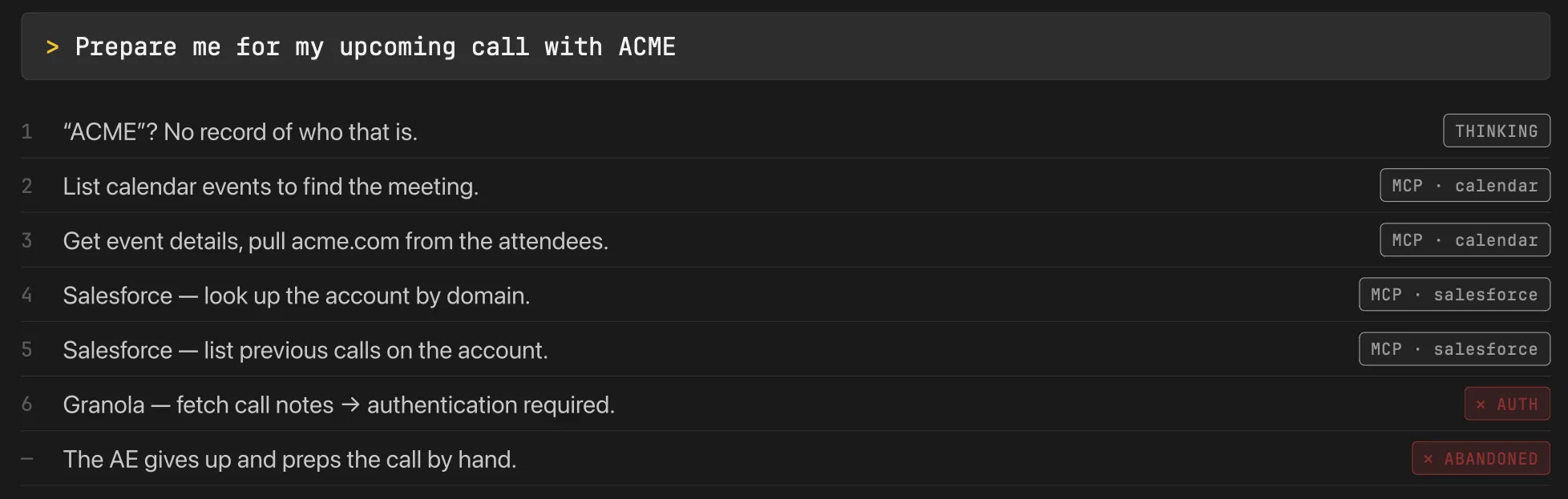
Six round trips, ~18k tokens, about two minutes, and it dead-ends on an auth prompt the AE can’t clear. So they close the tab and do it by hand. That’s the setup wall winning.
gtm-os, same prompt:
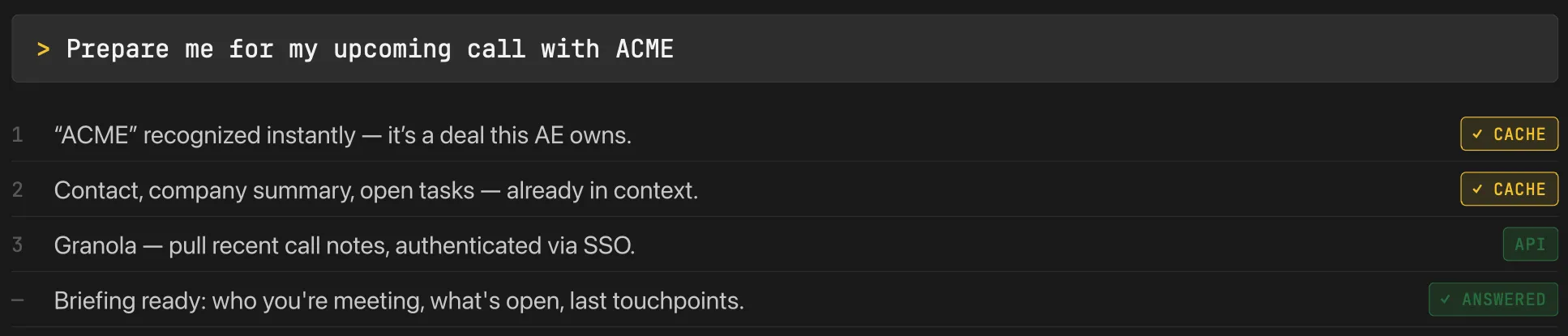
One tool call, ~3k tokens, about six seconds, done. Nothing about the model changed between those two runs. It’s the same brain. Every bit of that difference - the instant recognition, the silent auth, the answer instead of the shrug - lives in the harness.
There’s nothing stopping you
Go back to that conversation with my colleagues - the smart ones, stuck on “maybe it just sees the whole repo?” The gap was never that harnesses are hard. It’s that nobody had shown them the inside, so the whole thing stayed filed under magic.
There’s no magic. You watched the entire trick: a list, two loops, one HTTP call, and a function that runs what the model asks for. Everything that makes an agent feel smart - the memory, the tools, the sub-agents, the skills, the sandbox - is plain code wrapped around a model that, left alone, can only emit text. The model is the horse. The harness is the reins. And the reins are the part you can actually build.
That’s the bit I most want you to walk away with. The same model sits behind Cursor and Claude Code and the thing we run at Orb. They feel different because someone made different choices about what it sees, what it can do, and what comes back - not because anyone had a better brain to work with. Those choices were the whole job.
They’re also choices you’re completely capable of making.
Go deeper
If you want to push past the toy version, here’s where I’d send you. Roughly in the order I’d read them.
- Anthropic - Context Windows - the clearest diagrams I’ve seen of what’s actually piling up in the window turn over turn. The pictures alone are worth it.
- Anthropic - Context Engineering - the deep version of the lever I called the most important, with a real worked agent (
run_research_session) you can read top to bottom. - LangChain - Anatomy of an Agent Harness - the same teardown I did here, from a different angle. Good for triangulating the concepts.
- Martin Fowler - Harness Engineering - less of a build guide, but the graphics are great and it takes the “harness as its own discipline” framing seriously.
- Inside the Agent Harness - how Codex and Claude Code actually work under the hood, for when you want the real ones instead of my forty-line one.
learn-claude-code- a full reference implementation of a harness, if you’d rather read working code than prose. There’s a web version too.
And the two API docs everything above is built on:
- Messages API - the
model()function from the very start, documented properly. - Tool Use - the contract, the
tool_use/tool_resultround trip, all of it.
FIN